Guiding teams to the right policies for their AI agents
Helping teams put the right policies in place for their AI agents from day one, without needing to know every risk up front.
Context
Rubrik Agent Cloud keeps AI agents in check.
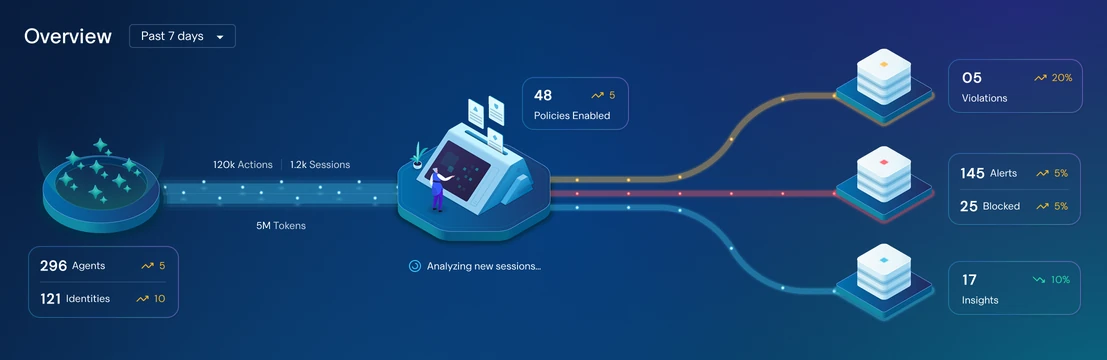
The live, animated hero visual from the Agent Cloud dashboard: agent activity flows through the company’s policies, which turn up violations, alerts and insights.
Security analysts and IT admins use Agent Cloud to monitor their company’s AI agents and catch the moment an agent, or the person using it, breaks the company’s rules.
Those rules are policies, written in plain English, like “never paste a secret key into a prompt” or “agents can’t delete files.” Agent Cloud can only catch what a policy describes, so everything starts with having the right policies in place.


Creating a policy: describe the rule, then review what Agent Cloud generates.
Our first customers joined as pilot customers, onboarding onto Agent Cloud while it was still taking shape.
The challenge
Customers didn’t know which policies to set up.
Our pilot customers were early in their AI agent journey, as everyone was in 2025. They knew they needed policies, but not which ones. Faced with an empty list of policies, most didn’t know where to start.
- A blank page
Writing a policy from scratch assumes you already know which risks matter to you. Most teams didn’t yet.
- Defaults that didn’t fit
We shipped some default policies early on, but not all of them applied to every kind of customer, so some got noise and others got gaps.
- Risks no one predicted
Even the right policies only catch what teams thought of in advance. New kinds of agent behavior slipped through.
Solution
Get protected on day one, then keep getting smarter.
We tackled it in two parts. Policy packs and a new onboarding flow get customers the right policies from the start. Insights then watch how their agents actually behave and point out what those policies missed.
Policies, bundled by theme
A policy pack is a ready-made set of policies around one theme, like data exposure prevention, cost control or coding agent security. Turning on a pack turns on every policy inside it, so teams don’t have to know or write each one themselves.
Start with the right packs for you
Because one set of defaults didn’t fit everyone, onboarding now starts by asking about the customer. Teams tell us their industry, see the policy packs that matter most for it, and choose which ones to turn on. Every policy in those packs is enabled straight away, so they’re protected from day one.
Change course anytime
Onboarding is a starting point, not a lock-in. Outside the flow, teams can browse every policy pack, turn more on, switch some off, and fine-tune the policies inside them as their use of AI agents grows.
Catch what the policies missed
Industry alone isn’t enough, because every company’s agents behave differently. So Agent Cloud also watches how agents behave in real time and raises an insight when it spots something worth a look that no existing policy covers, like an agent sending secrets to an outside website.
Each insight comes with a recommended policy to block or monitor that behavior, so the same thing doesn’t happen again. Teams can review it and turn it on in a few clicks.
Key decisions
Four decisions shaped the design.
- Start from packs, not single policies
Asking teams to pick dozens of individual policies recreated the blank page. Grouping them into themed packs turned it into a handful of clear choices.
- Ask about the customer, not the risks
Teams new to AI agents can’t list their risks, but they know their industry. Starting there let us recommend the right packs without asking questions they couldn’t answer.
- A starting point, not a lock-in
Onboarding gets teams protected quickly, and everything it sets up can be changed later, so no one has to get it perfect on day one.
- Learn from live behavior
Industry defaults only go so far. Insights based on how agents actually behave catch what no one predicted, and turn each finding into a policy that prevents it next time.
What’s next
To addWhere policy packs and insights go next.
Outcome
To addA headline result, e.g. how many pilot customers were protected on day one, or how many policies were created from insights.
To addFeedback from pilot customers or internal teams.